PT. Solid Gold Berjangka
Online System Transactions
1Explanation of the Online Trading Screen
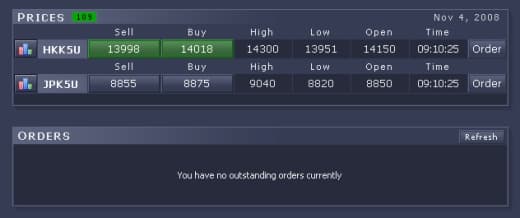
PRICES
A table showing reference price movements for HKK50 and JPK50. Several columns function as market and limit orders to open new positions.
In the "PRICES" table, the following columns function as orders:
a. Sell / Buy (Market Order)
Click/order button to open sell/buy positions that must be executed immediately at the best available price.
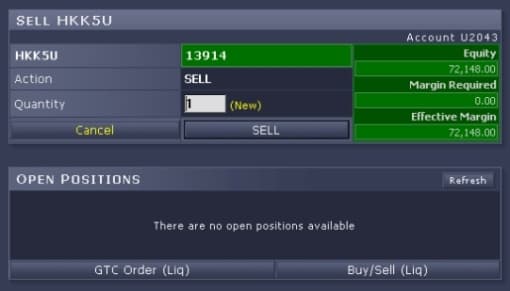
Example: clicking market sell will show a table like below:
b. Order (Limit Order)
Click/order button to open sell/buy positions by placing a desired price within a certain range (min 10 points, max 500 points from the current price). The limit order executes when the running price reaches the limit.
When the order column is clicked, a table appears like below:

Example (HKK50 price on SPA screen):
Sell = 25.420
Buy = 25.440
For transactions, the HKK50 column should be filled as follows:
- BUY at 25.450 and above up to 500 pts
- SELL at 25.410 and below up to 500 pts

ORDERS
A table showing transaction order status (Pending/Done) when using Limit Order/Stop Loss.

Menu Functions
Main: return to the default view (refresh or main menu).
Trade History: transaction records: TradeID, Account, Item, Sell/Buy, Quantity, Time, New/Liq/Order, Status.
Temporary Statement: temporary transaction report based on the latest user position.
Daily Statement: full daily transaction report for the previous day (T-1).
User Options: shows user status and allows password changes.
News/Announcements: headline news and content related to Asian and global stock indices.
Logout: used when the user wants to exit trading/login.
OPEN POSITIONS
Information showing opened positions, prices, and lots executed that day recorded in the online trading system.
GTC Order (Liquidation)
A click column for limit orders used to liquidate open positions.
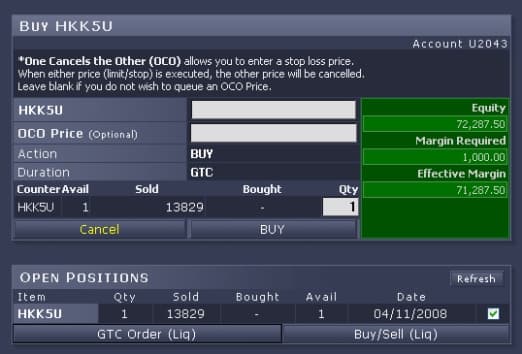
If GTC Order (Liq) is clicked in the Open Positions table, a table appears as below:
Buy/Sell (Liquidation)
A click column for market orders used to liquidate open positions by selecting the position to be liquidated in the open position column.
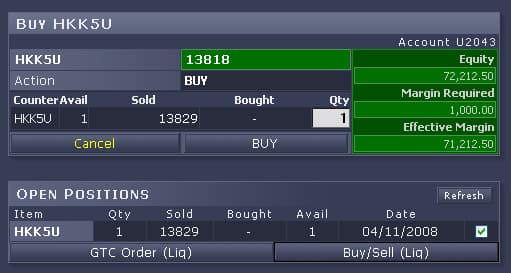
If Buy/Sell (Liq) is clicked in Open Positions, a table appears as below: